Physical Address
304 North Cardinal St.
Dorchester Center, MA 02124
Physical Address
304 North Cardinal St.
Dorchester Center, MA 02124

Learning to code has never been more accessible — or more exciting — than it is right now. Whether you’re a complete beginner or a seasoned developer looking to pick up a new language, understanding how to learn coding with AI can dramatically compress your learning curve. Artificial intelligence tools are reshaping education at every level, offering personalized feedback, instant debugging help, real-time explanations, and interactive coding challenges that traditional textbooks simply cannot match. In this comprehensive guide, we’ll walk you through exactly how to harness AI-powered tools to accelerate your programming journey, avoid common pitfalls, and build skills that actually stick — all backed by data, expert insights, and real-world examples.
Programming, at its core, is the art and science of giving instructions to a computer. These instructions, written in a specific language a machine can interpret, allow humans to build software, automate tasks, and solve complex problems. The history of programming stretches back further than most people realize.
Traditional programming education relied on:
These methods work — but they’re slow, often frustrating, and rarely personalized. Enter artificial intelligence. Today’s AI models can act as a patient tutor, a debugging partner, a code reviewer, and a project idea generator — all in one.
According to Wikipedia’s entry on Programming Languages, there are over 700 programming languages in existence today. Knowing which to learn, and how to learn efficiently, is where AI becomes a game-changer.
The U.S. Bureau of Labor Statistics projects software development jobs to grow 25% between 2022 and 2032 — much faster than the average for all occupations. Meanwhile, the global developer shortage is estimated to reach 4 million unfilled positions by 2025.
The pressure is on. Companies need skilled programmers now, not in three to five years after traditional education runs its course. This is exactly why learning how to use AI to learn programming faster has gone from a nice-to-have to an essential strategy.
A 2023 GitHub survey found that developers using GitHub Copilot completed coding tasks 55% faster than those who didn’t. Separate studies from Stanford found that AI-assisted programming education improved student outcomes by up to 40% compared to traditional self-study.
These numbers aren’t just impressive — they’re transformational.
| Feature | Traditional Learning | AI-Assisted Learning |
|---|---|---|
| Personalization | Low (one-size-fits-all) | High (adapts to your level) |
| Feedback Speed | Slow (forums, instructors) | Instant |
| Cost | Medium–High (courses, bootcamps) | Low–Free (many AI tools are free) |
| Availability | Limited (scheduled classes) | 24/7 on-demand |
| Debugging Help | Manual, time-consuming | Automated, precise |
| Code Review | Peer or instructor only | AI + peer options |
| Project Ideas | Limited to curriculum | Unlimited, customized |
| Language Support | Fixed curriculum language | Any language, any level |
| Learning Curve | Steep without guidance | Gentler with AI scaffolding |
| Engagement | Passive (reading/watching) | Interactive and conversational |
| Tool | Best For | Price | Languages Supported | Standout Feature |
|---|---|---|---|---|
| GitHub Copilot | Code completion & suggestions | $10/month | 30+ | Real-time in-IDE suggestions |
| ChatGPT (GPT-4o) | Explanations, tutoring, debugging | Free / $20 mo | All major languages | Conversational depth |
| Claude (Anthropic) | Long code reviews, explanations | Free / $20 mo | All major languages | Nuanced reasoning |
| Tabnine | Autocomplete in IDE | Free / $12 mo | 30+ | Privacy-focused, local AI |
| Replit AI | Beginners, project building | Free / $20 mo | 50+ | Browser-based IDE + AI |
| Codecademy AI | Structured curriculum with AI hints | $17/month | Python, JS, SQL, more | Guided learning paths |
| Codeium | Free Copilot alternative | Free | 70+ | Zero cost, broad support |
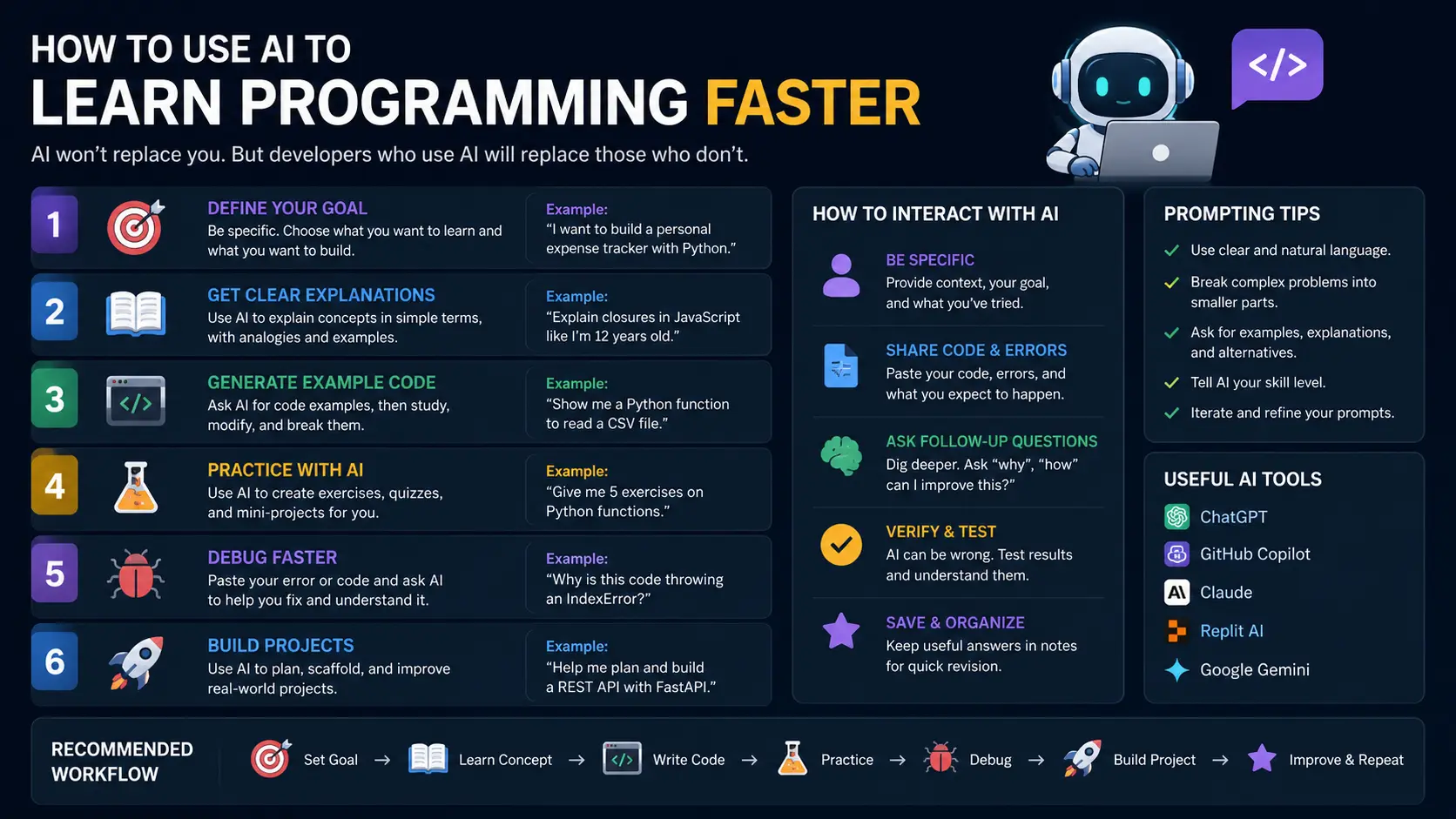
Before firing up any AI tool, get specific about what you want to achieve. Vague goals produce vague results.
Bad goal: “I want to learn Python.”
Good goal: “I want to build a web scraper in Python within 30 days to automate data collection for my business.”
Once you have a concrete goal, your AI tutor can:
Pro-Tip: Paste your learning goal into ChatGPT and ask it to create a 30-day structured learning plan. It will outline daily topics, recommend resources, and even suggest mini-projects along the way.
Most beginners make the mistake of treating AI like a fancier Google. The real power comes from conversation.
Here’s how to engage AI effectively for learning:
self is used in Python classes. Can you walk me through it step by step?”This conversational loop — question, explanation, example, quiz — is far more effective than passively watching tutorial videos.
One of the biggest mistakes new programmers make is spending too long on tutorials before building anything real. AI solves this perfectly.
Use AI to scaffold your first project:
Example Project Progression:
Each project teaches concepts in context, and AI keeps you unblocked when you get stuck.
Debugging is where beginners spend most of their time — and where frustration peaks. AI is remarkably good at this.
How to debug effectively with AI:
This approach turns every bug into a learning moment rather than just a problem to eliminate.
As your projects grow, code quality becomes critical. Use AI as a code reviewer:
Pro-Tip: Compare your code side-by-side with AI’s improved version. Study the differences line by line — this is one of the fastest ways to level up your code quality.
AI is powerful, but it works best alongside structured learning, not in isolation. Use it to complement:
When you hit a concept in your course that’s confusing, immediately bring it to your AI tutor for a deeper explanation with custom examples.
❌ Copy-pasting AI code without understanding it — You’ll hit a wall the moment you need to modify or debug it.
❌ Relying on AI for every line — This prevents muscle memory and deep understanding from forming.
❌ Skipping fundamentals — AI can’t replace your understanding of core concepts like data structures, algorithms, and logic.
❌ Using AI as a crutch instead of a coach — Ask it to guide you, not do the work for you.
❌ Ignoring error messages — Don’t immediately paste errors into AI. Spend 5 minutes reading and researching the error yourself first.
❌ Not validating AI responses — Always test code in your environment. AI can generate plausible-looking but incorrect solutions.
The Problem: AI models have training cutoffs and can generate code that’s deprecated, incorrect, or inefficient.
The Solution:
The Problem: Beginners who lean too heavily on AI never develop independent problem-solving skills — a critical quality for real-world employment.
The Solution:
The Problem: AI can generate an overwhelming amount of information, leading to confusion rather than clarity.
The Solution:
The Problem: Self-directed AI learning lacks the accountability structure of a formal course or bootcamp.
The Solution:
The Problem: With so many AI tools available, beginners often feel paralyzed or waste time switching between platforms.
The Solution: Use the simple framework below:
| Task | Best Tool |
|---|---|
| Learning a new concept | ChatGPT / Claude |
| Writing code faster in your IDE | GitHub Copilot / Codeium |
| Building and running a project | Replit AI |
| Structured curriculum + hints | Codecademy AI |
| Code autocomplete (privacy-focused) | Tabnine |
Absolutely. In fact, AI tools like ChatGPT and Replit AI are particularly well-suited for complete beginners because they can explain concepts from the ground up, adjust the difficulty based on your questions, and never make you feel judged for asking “basic” questions. Start with a beginner-friendly language like Python, set a clear goal, and use AI as your patient, always-available tutor.
Only if you use it passively. If you copy-paste AI-generated code without understanding it, yes — your skills won’t develop. But if you use AI as a coach (to explain, quiz, review, and guide), it will make you a significantly better programmer by accelerating your exposure to best practices, diverse approaches, and clean code principles.
Python remains the top recommendation in 2026 for most learners because:
JavaScript is a close second, especially if your goal is web development.
With consistent daily practice (1–2 hours/day) and effective AI-assisted learning, most dedicated beginners can:
AI can compress these timelines by 30–50% compared to traditional self-study, but consistent practice is still the deciding factor.
Yes — using AI as a learning tool is completely ethical. It’s no different from using a textbook, a tutor, or Stack Overflow. The key distinction is intent: using AI to learn and understand is ethical; using AI to submit work as your own in academic settings without disclosure may violate academic integrity policies. Always check the rules of your institution or course. In the professional world, AI-assisted development is not only accepted — it’s increasingly expected.
Several excellent free options exist in 2026:
The landscape of programming education has been permanently and profoundly transformed. Learning to code in 2026 doesn’t have to mean spending thousands of dollars on bootcamps, wading through outdated textbooks, or spending hours stuck on a single error with no one to ask. With the right AI tools and strategies, you can learn faster, build sooner, and grow more confidently than any previous generation of programmers.
Here’s your action plan to get started today:
Remember: every expert programmer was once a beginner who got stuck, got confused, and kept going anyway. The difference today is that you have an extraordinary advantage they didn’t — an intelligent, patient, endlessly available learning partner in your corner.
You have everything you need. The only question is: when do you start?
The answer should be right now. 🚀
For further reading, explore the following high-authority resources:


Great article! I’ve been using Claude Tokenizer () for similar projects. Claude Tokenizer
Très bon article ! J’utilise Claude Fable 5 sur / pour ce type de besoin. Claude Fable 5