Physical Address
304 North Cardinal St.
Dorchester Center, MA 02124
Physical Address
304 North Cardinal St.
Dorchester Center, MA 02124


How to start coding with zero experience is one of the most searched questions on the internet right now — and for good reason. Millions of people globally are waking up to the fact that coding is no longer just for engineers in Silicon Valley. It’s a universal career skill, and 2026 is genuinely the most beginner-friendly time in history to learn it.
But here’s what most guides won’t tell you: most people who try to start coding with zero experience quit within the first three weeks. Not because they aren’t smart enough — but because they started wrong. They picked the wrong language, followed the wrong path, or drowned in theory before writing a single real line of code.
This guide is different. Whether you’re a 19-year-old college dropout, a 35-year-old marketing manager eyeing a career switch, or a stay-at-home parent with two free hours a day — this is your complete, no-fluff roadmap for how to start coding with zero experience in 2026, built on real-world strategies that actually work.
By the end of this article, you will know:
Let’s get into it.
Before you learn how to start coding with zero experience, you need to understand what coding actually is — stripped of all intimidating jargon. This is the foundation every beginner must have before taking their first step.
At its core, coding is just giving instructions to a computer in a language it understands. Think of it like a recipe. When you follow a recipe, you’re executing a set of instructions: add two eggs, mix for three minutes, bake at 180°C. Coding works the same way. You write instructions (called code), the computer reads them, and it performs a task — loading a webpage, calculating a loan payment, or recommending your next Netflix show.
The “language” part is where most people who want to start coding with zero experience get confused. There are hundreds of programming languages — Python, JavaScript, Java, C++, and more. Each has its own syntax (grammar rules), but the logic underneath is nearly identical. Once you learn one language well, picking up a second becomes dramatically easier.
Here’s what coding is NOT:
In 2026, coding touches every industry: healthcare, finance, education, agriculture, gaming, fashion, and more. Learning to code isn’t just a tech skill anymore. It’s a universal career advantage — and you absolutely don’t need any prior experience to start.
The timing has never been better — and this isn’t just hype.
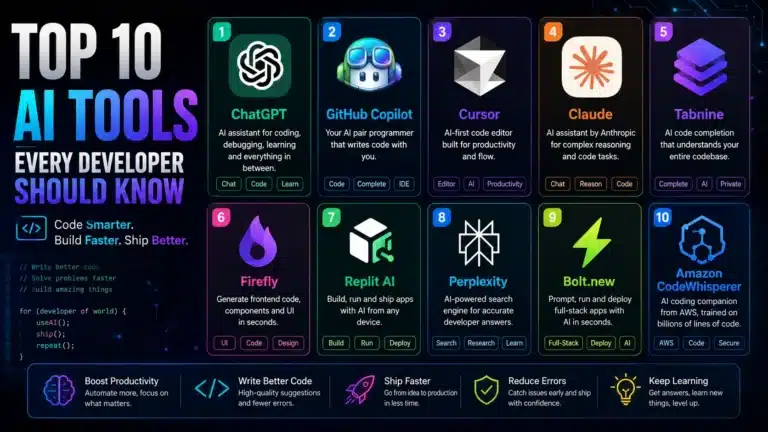
AI tools make learning faster than ever. Tools like GitHub Copilot, ChatGPT, and Claude now act as your personal coding tutor — answering questions in plain English, debugging your errors instantly, and explaining concepts in multiple ways until they click. A beginner in 2026 has access to on-demand mentorship that simply didn’t exist five years ago.
Remote tech jobs are everywhere. Software development roles remain among the top three most in-demand job categories globally, with a large percentage being fully remote — meaning geography is no longer a barrier to a coding career.
Free and affordable resources are abundant. A decade ago, learning to code meant an expensive university program or scattered forum posts. Today, world-class education is free on platforms like freeCodeCamp, The Odin Project, and CS50 from Harvard.
The barrier to building is lower than ever. With tools like Vercel and Netlify, a complete beginner can deploy a real working project to the internet within their first month of learning.
One of the most inspiring examples of how to start coding with zero experience and succeed comes from Priya Sharma (name used with permission), a 28-year-old from Bangalore who worked as a barista until early 2024. She had zero technical background — zero. She spent 10 months learning Python and Django through free resources, built three portfolio projects, and landed a junior backend developer role at a SaaS startup paying 3x her previous salary. Her daily learning schedule? Two hours in the morning before her shift, and one hour at night.
Her biggest advice: “Don’t try to learn everything. Pick one thing, go deep, and build something real as soon as possible.”
This is where most beginners stall for weeks. They read ten different “best language for beginners” articles and end up paralyzed by choice. Here’s the truth: the best first language is the one you will actually stick with.
In 2026, there are three clear beginner-friendly choices for anyone figuring out how to start coding with zero experience:
Python reads almost like English. Its syntax is clean, its community is massive, and it’s used across web development, data science, AI/ML, automation, and scripting. Python’s official documentation is also one of the best-written in the industry.
# Your very first Python program
name = input("What's your name? ")
print(f"Hello, {name}! Welcome to coding.")
Even that small snippet shows how readable Python is. No semicolons, no curly braces, no noise. Just clean, human-readable logic.
Best for: Data science, machine learning, automation, general-purpose programming, beginners wanting maximum job flexibility.
JavaScript is the language of the web. Every website you interact with uses it. With JavaScript, you can build things that look and feel real very quickly — buttons that click, forms that validate, pages that animate. That immediate visual feedback is incredibly motivating when you’re starting to code with zero experience.
// Change a webpage element with JavaScript
document.getElementById("greeting").textContent = "Hello, World!";
Best for: Web development (front-end and back-end), people who want fast visible results, those aiming for freelance web work.
SQL (Structured Query Language) is often overlooked by beginners starting coding with zero experience, but it’s arguably the most universally useful coding skill in the job market. Nearly every company stores data in databases, and nearly every data-related role requires SQL.
-- Find all customers who spent more than $500
SELECT name, total_spent
FROM customers
WHERE total_spent > 500
ORDER BY total_spent DESC;
Best for: Data analysis, business intelligence, anyone targeting non-engineering tech roles.
If you have absolutely no idea where to start coding: start with Python. It’s forgiving, versatile, and will serve you in almost any direction you want to go. Once your Python fundamentals are solid (typically 2–3 months of consistent practice), you can branch into JavaScript, SQL, or any other language based on your specific career goals.
One of the most overlooked steps when you start coding with zero experience is environment setup. Most beginners skip this and jump straight into learning, then get frustrated when things break unexpectedly. Before you write a single line of real code, get your tools in place.
Here’s a clean, beginner-proof setup for 2026:
Download Visual Studio Code — it’s free, incredibly powerful, and used by millions of professional developers worldwide. Install these extensions immediately:
Don’t fear the terminal (command line). It looks intimidating but you only need about 10 commands to start. On Windows, use PowerShell or install Windows Subsystem for Linux (WSL). On Mac, the built-in Terminal is perfect.
Set up a free GitHub account from day one. Git tracks changes in your code, and GitHub is where you store and share it publicly. Every employer will look at your GitHub profile. Treat it like your coding resume.
# Your first Git commands — learn these early
git init                        # Start tracking a project
git add .                       # Stage all changes
git commit -m "My first commit" # Save a snapshot
git push                        # Upload to GitHub
Pick ONE primary platform and stick to it for at least 60 days. Top recommendations for those starting to code with zero experience:
Here is a realistic, structured plan anyone can follow when learning how to start coding with zero experience. Assumes 1.5–2 hours of focused practice per day.
The first month of learning how to start coding with zero experience is all about building rock-solid fundamentals. Resist the urge to skip ahead — everything later depends on what you build here.
Week 1 — Orientation and Setup
Week 2 — Logic and Control Flow
Week 3 — Functions and Organization
Week 4 — Data Structures
By Month 2, you’ve crossed the hardest part of how to start coding with zero experience — you have the basics. Now it’s time to stop consuming and start creating.
Week 5 — Introduction to Frameworks or the Web
For Python learners: start with Flask or explore pandas for data work. For JavaScript learners: begin learning HTML and CSS alongside JavaScript — they work together naturally.
Week 6 — Your First Real Project (The Most Important Week)
Stop following tutorials. Start building something you chose yourself. This is the hardest and most important step when you’re starting to code with zero experience. Ideas to try:
The project doesn’t have to be perfect. It has to be yours.
Week 7 — Debugging and Problem Solving
Week 8 — APIs and Real Data
Month 3 is where people who figured out how to start coding with zero experience transform into people who get paid for it. Your goal this month: be visible and be hireable.
Week 9 — Project 2: Something More Complex
Build a second project slightly beyond your current comfort zone. Strong options:
Week 10 — Polish Your GitHub Profile
Week 11 — Start Talking About What You’re Building
Week 12 — Apply, Network, Keep Building
There’s no shortage of resources. Here are the ones genuinely worth your time:
freeCodeCamp — 3,000+ hours of curriculum covering HTML/CSS, JavaScript, Python, data analysis, and machine learning. All free. All project-based. Certifications respected by employers globally.
The Odin Project — Possibly the most comprehensive free full-stack web development curriculum on the internet. Opinionated (which is great for beginners learning how to start coding with zero experience) and has an active Discord community.
CS50 (Harvard) — Harvard’s Introduction to Computer Science, free on edX. David Malan is one of the most effective teachers in the world. This course will genuinely change how you think about problems.
MDN Web Docs — The most reliable documentation for HTML, CSS, and JavaScript. Bookmark it from day one.
YouTube Channels Worth Following:
Udemy — Courses by Angela Yu (“100 Days of Code: Python”) and Jonas Schmedtmann (“The Complete JavaScript Course”) are excellent. Wait for sales — courses regularly drop under $15.
Frontend Masters — More advanced, exceptional quality. Worth it once you’ve cleared the beginner phase.
Technical skills get your resume noticed. These skills get you hired.
Problem Decomposition — The ability to take a large, vague problem and break it into small, solvable pieces. Practice this by narrating your approach before you write a single line of code.
Reading Documentation — This separates average coders from excellent ones. Get comfortable with official docs. When you encounter a new library or framework, your first instinct should be to read the documentation, not watch a YouTube video.
Debugging Mindset — Your code will be wrong more often than it’s right. This is completely normal. Develop a calm, systematic approach: read the error, isolate the problem, form a hypothesis, test it.
Version Control Habits — Commit your code often, write clear commit messages, learn basic Git branching. Employers look at your commit history. It tells them how you actually work day to day.
Communication — Being able to explain a technical concept in plain language is enormously valuable. Practice by explaining what you built to a non-technical friend or family member.
These are the traps that derail most beginners who are learning how to start coding with zero experience. Knowing them in advance puts you ahead.
Tutorial Hell — Watching tutorial after tutorial without building anything. You feel productive, but you’re not actually learning. The rule: for every hour of tutorial, spend at least an hour building something yourself.
Learning Multiple Languages at Once — Pick one language. Stick with it for at least three months. Mastery of one dramatically accelerates learning of all others.
Skipping the Fundamentals — The temptation is to jump straight to React, Django, or whatever framework is trending. Resist. Solid fundamentals in core language concepts will make learning any framework dramatically faster and less frustrating.
Comparing Your Progress to Others — Social media makes it look like everyone is building impressive projects in week one. They’re not. Focus on your own progress measured week by week against your previous self.
Waiting Until You’re “Ready” to Apply — There is no magical “ready” state. Most junior developers feel underprepared when they land their first role. Apply when you have two or three portfolio projects — period.
Not Asking for Help — The coding community is one of the most helpful communities on the internet. Stack Overflow, Reddit, Discord servers — people genuinely want to help beginners. Post your question, share your code, and ask.
Here’s an honest, data-based answer:
These timelines assume consistent, deliberate practice — not passive tutorial watching.
James Okonkwo, a 31-year-old accountant from Lagos, Nigeria, began learning how to start coding with zero experience in January 2024 with a specific goal: transition into data analytics. He used freeCodeCamp and supplemented with Kaggle’s free data science courses. By August 2024 — eight months later — he had completed four portfolio projects, including a sales trend analysis for a local business and a COVID-19 data visualization. He landed a junior data analyst role at a fintech startup with a 60% salary increase over his previous accounting position.
His key habit: Sunday evenings were spent reviewing the week’s learning and planning the next week’s goals. Thirty minutes of planning saved him hours of aimless studying throughout the week.
Once you have fundamentals and two to three portfolio projects, here’s how to convert your coding skills into real income.
Build Your Online Presence
Your Portfolio Website
Build a simple personal site with: a short bio, links to your projects with live demos, your GitHub profile, and a contact form. This site is itself a portfolio piece that demonstrates your skills in action.
Where to Apply for Your First Coding Role
For Freelance Coding Work
AI Is a Tool, Not a Replacement — GitHub Copilot and similar tools are now standard in professional development. Learn to use them as assistants. They speed up boilerplate but can’t replace the deep understanding that makes a great developer. Use AI to accelerate your learning — not to bypass it.
Full-Stack Is More Accessible Than Ever — Frameworks like Next.js (JavaScript) and FastAPI (Python) have made it easier for people starting coding with zero experience to build complete, functional applications faster than ever before.
Cloud Basics Are Now Expected Early — Even at the junior level, familiarity with basic cloud services (AWS, Google Cloud, or Azure) is increasingly expected. Knowing how to deploy an app to the cloud is a valuable early skill.
Open Source Contribution — Contributing to open source projects on GitHub — even documentation fixes or small bug fixes — is a powerful way to build your portfolio and get your name in front of senior developers who review pull requests.
This is something most guides never address — but it matters deeply. The mental side of learning how to start coding with zero experience is just as important as the technical side.
Learning to code is a cognitive marathon. You will hit walls. You will spend three hours on a bug only to discover it was a missing comma. You will read something five times and still not understand it. This is not a sign that you can’t do it. This is just what learning feels like from the inside.
A few principles that genuinely help:
In 2026, there has never been more access to coding education, more demand for people with coding skills, or more tools to accelerate your learning. Figuring out how to start coding with zero experience is genuinely easier than it has ever been.
What hasn’t changed is this: learning to code takes time, consistency, and a willingness to sit with discomfort. Nobody learns it overnight. But with the right approach — one language, one resource, daily practice, and real projects — you can go from zero experience to job-ready in under a year.
Here is your action plan for today:
The first line of code you write will feel clumsy. The hundredth will feel natural. The thousandth will feel like a superpower. That is the journey of everyone who has ever learned how to start coding with zero experience — and it’s a journey you can absolutely complete.
Start typing.
Q: Do I need a math background to start coding with zero experience? No. Basic arithmetic is sufficient for most programming paths. Data science and machine learning eventually involve more math (statistics, linear algebra), but web development, automation, and most junior roles do not require advanced mathematics at all.
Q: Can I learn how to start coding with zero experience for free? Absolutely. freeCodeCamp, The Odin Project, and CS50 are all completely free and contain thousands of hours of quality education. A laptop and an internet connection are all you need to begin.
Q: Should I go to a bootcamp or self-teach when starting coding with zero experience? Both can work. Bootcamps offer structure, community, and accountability — but cost $10,000–$20,000 on average. Self-teaching is free or low-cost and flexible, but requires stronger self-discipline. Many successful self-taught developers take a hybrid approach: self-teaching with occasional structured courses.
Q: Is it too late to start coding at 30, 40, or 50? No. Many successful career-switchers start in their 30s and 40s. Maturity, professional experience, and domain knowledge from your previous career are genuine advantages — particularly in roles that intersect with specific industries like healthcare tech, fintech, or edtech.
Q: How do I know when I’m ready to apply for jobs after starting to code with zero experience? When you have two to three projects on GitHub that you built yourself (not copied from tutorials), can explain your code in a conversation, and can solve Easy-level coding challenges consistently — you’re ready to start applying. Don’t wait for perfect.
Written for codezone.blog — your home for practical, no-fluff coding education for real people.
Tags: how to start coding with zero experience, coding for beginners, learn to code 2026, programming for beginners, beginner coding guide, learn python 2026, self-taught developer, coding career, zero experience coding